
Getting Started with HTML
HTML, short for HyperText Markup Language, is the fundamental language used to structure and present content on the web. In this article, we’ll explore the basics of HTML, including its tags and their usage. If you’re new to HTML or need a refresher, you’re in the right place! Let’s dive in and learn how to create your first HTML document.
Creating Your First HTML Document:
To begin, open a plain text editor such as Notepad or Any editor and follow these steps:
Type the following code:
Welcome to My Website!
This is my first paragraph.
Save the file with a .html extension, such as “index.html”.
Understanding HTML Tags
HTML tags are the building blocks of any HTML document. They provide structure and define the elements within a web page. Tags are enclosed in angle brackets and typically come in pairs. The opening tag denotes the beginning of an element, while the closing tag indicates its end. Let’s analyze the code snippet mentioned above:
- : This declaration specifies the HTML version being used, which is HTML5.
- : The root element of an HTML document. All other elements are nested within it.
- : Contains metadata and title information for the document.
-
: Defines the title of the web page, which appears in the browser's title bar or tab. - <body>: Encloses the visible content of the web page.
-
: Represents a heading element, where "My Websites" is the text content of the heading.
-
: Defines a paragraph element, with "My Paragraph" as its content.
Output and Rendering
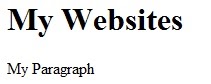
After saving the HTML file and opening it in a web browser, you will see the rendered output. In this case, the browser will display the heading “My Websites” and the paragraph “My Paragraph.” This is the result of the HTML tags and their corresponding content.
Summary and Key Points
-
HTML is the Markup Language used for structuring and presenting content on the web.
-
HTML tags are enclosed in angle brackets and come in pairs: opening and closing tags.
-
HTML documents begin with the declaration and contain the , , and elements.
-
The
tag defines the title of the web page, which appears in the browser. -
The <h1> tag represents a heading element, while the <p> tag defines a paragraph element.
-
Saving an HTML file with a .html extension and opening it in a browser renders the output.
-
Always include the declaration at the beginning of an HTML document.
-
Use appropriate opening and closing tags to enclose content within elements.
-
Experiment with different HTML tags and their attributes to enhance the structure and appearance of your web pages.
-
Remember that HTML provides the structure, while CSS (Cascading Style Sheets) is used for styling and layout (next tutorial).
By following these basics, you’re now ready to continue your journey into HTML and build more complex and interactive web pages.